Case study: Full-Stack Web Apps Hosted on Linux
Overview
Two web applications I built and then deployed and maintain myself on the same Ubuntu VPS: Read Smart, a student management system, and a QR attendance system for lectures. I include them because deploying and keeping an app running, not only writing it, is the part of the work that overlaps with infrastructure. The demo databases contain seed data, not real student records.
Problem
Both address a university-style workflow. Read Smart covers academic records, enrolment and a library module with separate admin, teacher and student views. The QR system lets a lecturer open a session that students check into by scanning a code, with attendance recorded and exportable. Beyond the applications themselves, the infrastructure question was how to host two different stacks on one server without them interfering with each other.
My role
I built both applications as academic and personal projects (the QR system as part of my MSc at the University of the West of Scotland) and I did the deployment myself: the Nginx configuration, process management, databases, HTTPS and ongoing maintenance. These are not paid client projects.
Architecture
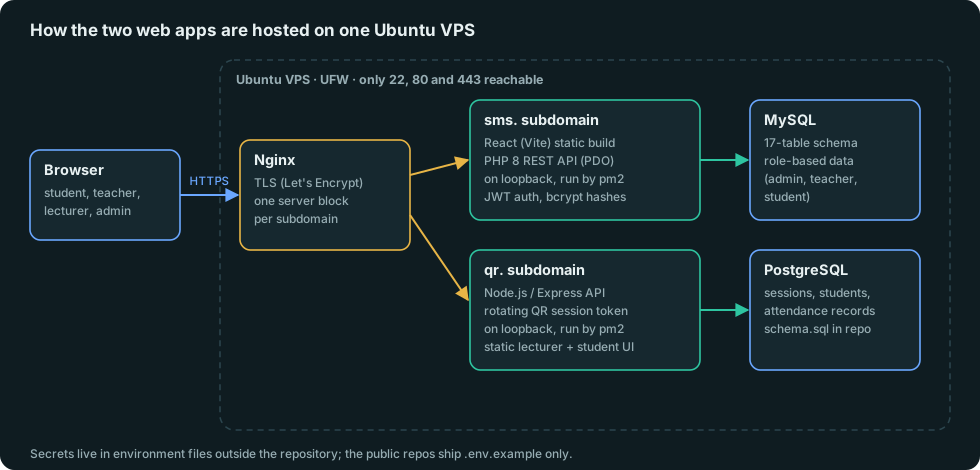
Technology stack
- Read Smart: React 18 with Vite, Tailwind CSS and Recharts on the frontend. PHP 8 with PDO and a REST API. MySQL with a 17-table schema. JWT (HS256) authentication and bcrypt-hashed passwords.
- QR attendance: Node.js with Express, PostgreSQL, a rotating QR token per session, session-based JWT authentication, CSV export, and a test suite run with
npm test. Architecture diagrams are in the repository. - Hosting: Ubuntu, Nginx reverse proxy with Let’s Encrypt certificates, pm2 for the app processes, UFW.
Implementation
- Role-based access. Read Smart separates admin, teacher and student portals and enforces them in the API, not only in the interface.
- One server block per subdomain. Each app has its own Nginx configuration and upstream on loopback, so adding or changing one does not touch the other.
- Process management. pm2 keeps the app processes running and restarts them if they crash.
- Configuration outside the code. Database credentials and signing secrets live in environment files that are excluded from git. The public repositories include only
.env.example. Before publishing the Read Smart repository I audited it for secrets and rotated the ones on the server. - Database setup as code. Both apps ship a schema (
schema.sql) so the database can be recreated from the repository.
Challenges
- Secrets hygiene. Application code tends to accumulate credentials. Before making the Read Smart repository public I scanned it, moved every hard-coded secret into environment configuration, and rotated the ones on the server, then confirmed the live site still worked. I now treat that check as a required step before publishing any repository.
- Two stacks, one box. PHP/MySQL and Node/PostgreSQL have different runtimes and ports. Keeping every app on loopback behind Nginx made the public surface a single, well-understood entry point.
Testing
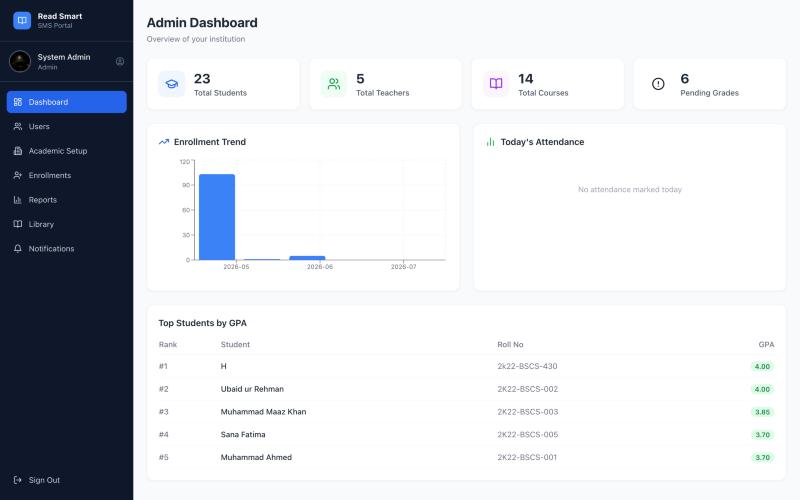
The QR system has a unit and integration test suite in the repository (npm test, with npm run test:unit for tests that need no database). For Read Smart I verified the deployed app by signing in to the live admin dashboard after each deployment change. I do not have an automated test suite for it, and I have not run load tests on either application.
Results
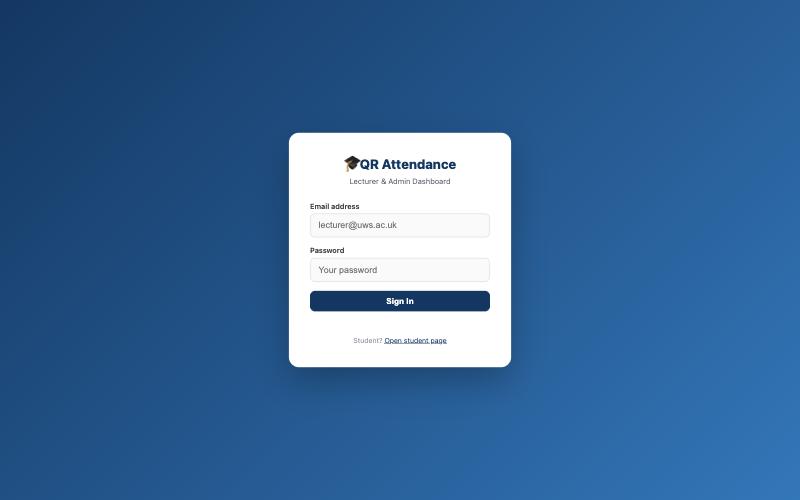
Both applications are live on my server behind HTTPS, with source published and a repeatable database setup. They are demonstration systems, so I make no claims about user numbers or scale.
Lessons learned
- Deployment is part of the application. A project is not done until it runs somewhere other than my laptop.
- Keep every upstream on loopback and let one reverse proxy be the front door.
- Treat secrets as a deployment concern from day one, and check for them before publishing.
Current limitations, stated plainly: the Read Smart API runs on PHP’s built-in server under pm2 behind Nginx. That works for a demo but is not what I would use for production, where PHP-FPM is the right choice, so moving it is on my list. Neither app has automated deployment yet. A CI/CD pipeline is one of my next projects.
See the plain-PHP practice project with prepared statements, hashed passwords and CSRF protection