Case study: Prometheus and Grafana Monitoring Stack
Overview
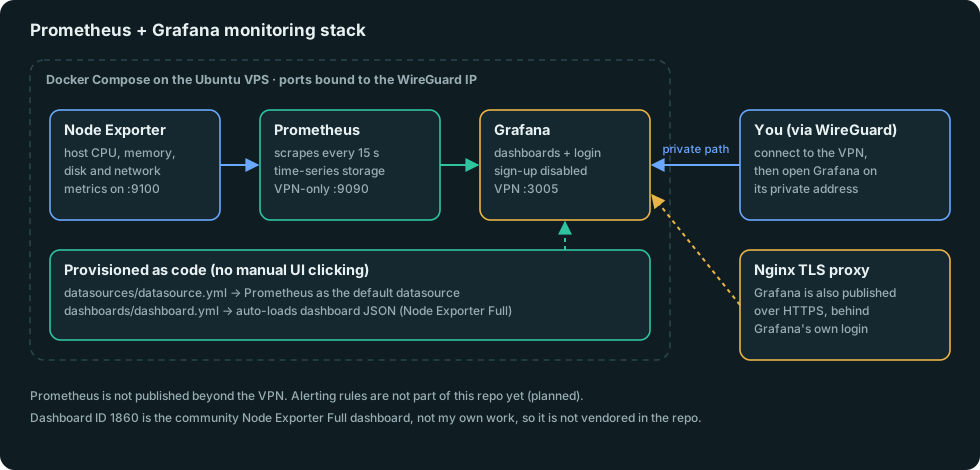
A monitoring stack for the server that hosts all my other projects. It collects host CPU, memory, disk and network metrics, stores them as time series, and shows them on dashboards. Nothing is set up by hand in the Grafana interface, so the whole stack can be rebuilt on a new machine with docker compose up -d.
Problem
When something on a self-managed server slows down or dies, application logs rarely show whether the cause is the host: CPU, memory pressure, a filling disk or a saturated network link. I wanted that visibility before the next incident, not during it, and I wanted the setup to be reproducible instead of a pile of manual clicks I would forget.
My role
Solo project: I chose the components, wrote the Compose file and provisioning config, decided how it is exposed, and documented it. It is a personal learning and portfolio project, not a client engagement.
Architecture
Technology stack
Docker and Docker Compose, Prometheus, Grafana, Node Exporter, WireGuard for private access, Nginx as a TLS reverse proxy.
Implementation
- Node Exporter exposes host-level metrics (CPU, memory, disk, network) on port 9100.
- Prometheus scrapes Node Exporter every 15 seconds and stores the series.
- Grafana provisioning as code.
provisioning/datasources/datasource.ymlregisters Prometheus as the default datasource at container start, andprovisioning/dashboards/dashboard.ymlauto-loads any dashboard JSON from a folder. The dashboard I use is the community “Node Exporter Full” (ID 1860). It is someone else’s work, so it is not copied into the repo. - Configuration from the environment. The Grafana admin password and the bind address come from a gitignored
.env. The repo ships.env.example. Self-service sign-up is disabled. - Network exposure.
BIND_ADDRlimits Prometheus and Grafana to a single interface, which on my server is the WireGuard address. Grafana is additionally published over HTTPS through an Nginx reverse proxy that talks to the private address, so the container itself never listens on the public interface, and Grafana’s own login protects the page. Prometheus is not published beyond the VPN.
Challenges
The main design question was exposure. A monitoring dashboard is useful from anywhere and dangerous if it is open to the world. I settled on private bindings by default, with the reverse-proxy publication as a deliberate, authenticated exception for Grafana only. I would tighten that further (for example, VPN-only access or an extra authentication layer in front) before using this for anything beyond a personal server.
Testing
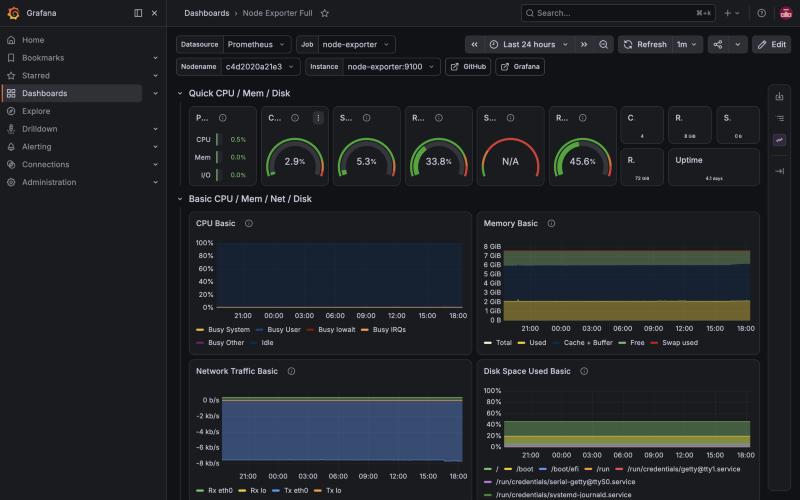
I checked the result in Grafana itself. The Node Exporter Full dashboard renders live CPU, memory, network and disk panels from the Prometheus datasource, as in the screenshot below, which was captured from the running stack.
I have not written automated tests for this stack. Verification so far is by inspection of the live dashboards.
Results
A reproducible, private-by-default monitoring stack with live host metrics and dashboards that need no manual setup after first boot. I have no uptime or alert-response figures to report, and I will not invent them.
Lessons learned
- Provisioning as code removes the “how did I set that up?” problem and makes the stack disposable.
- Decide exposure first, then wire the tools. Binding to a private interface by default is easier than closing a public one later.
- A dashboard shows what happened. It does not tell anyone when something goes wrong.
What is not there yet: alerting rules and notifications. They are the obvious next step, followed by tying the metrics to the other services on the box.