Setting Up and Managing My Own Servers
Setting Up and Managing My Own Servers
Hey there!
A big chunk of what I’ve learned this year didn’t come from a course: it came from breaking and fixing my own Ubuntu server on OVH, over and over, until it stopped breaking.
What’s actually running
I self-host a few real projects on a single OVH VPS:
- Read Smart (Student Management System): live at sms.marrecluse.net
- QR Attendance System: live at qr.marrecluse.net
- A Prometheus/Grafana monitoring stack watching the whole box
- This portfolio’s supporting infrastructure
Each one gets its own subdomain via DNS, routed through Nginx as a reverse proxy on the same box.
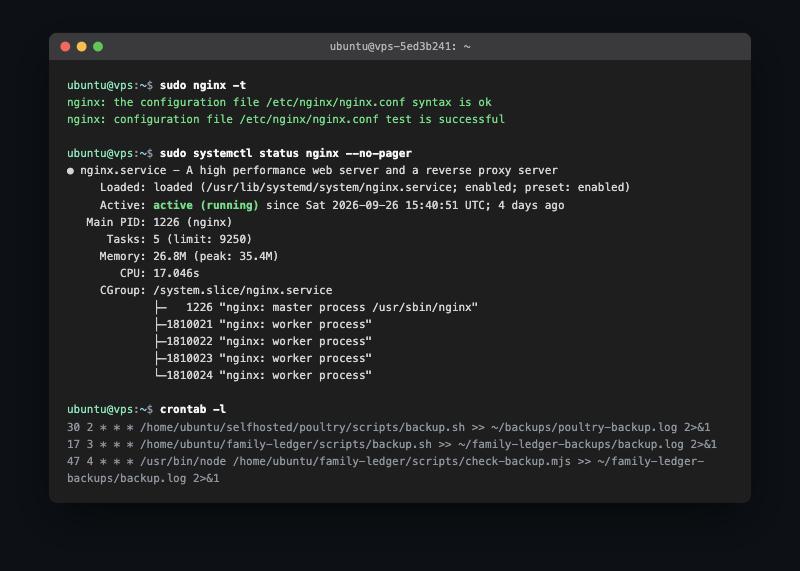
What “self server setup” actually involves
- Provisioning the VPS and hardening it: SSH config, firewall rules, keeping unnecessary services off.
- Configuring Nginx as a reverse proxy per subdomain, instead of one messy config file for everything.
- Managing multiple app stacks (PHP, Node.js) side by side without them fighting over ports.
- Setting up MySQL for each app and being disciplined about backups.
- Automating routine maintenance with rsync and cron rather than doing it by hand and forgetting.
- Actually reading logs when something goes down, instead of just restarting the service and hoping.
What I’d tell past-me
Running your own server teaches you things a tutorial can’t: what it feels like at 1am when a service silently dies, why monitoring matters, and why “it works on localhost” means nothing once DNS and a reverse proxy are involved. It’s slower than deploying to a managed platform, but I understand my own infrastructure now in a way I didn’t before.
Happy hosting! 🚀
This post is licensed under
CC BY 4.0
by the author.