Setting Up and Securing a VOIP Server
Hey there!
I’ve been learning VOIP from a system administrator’s angle rather than a developer’s: not “how do I build a calling app,” but “how do I stand up and secure a real PBX the way an org actually runs one.” This post is that setup, end to end, including the mistake that taught me the most.
OVH server, not my MacBook
The server needs a stable, publicly routable-enough address and to be always on: a laptop that sleeps and sits behind home NAT can’t reliably receive SIP registrations or RTP media from anywhere else. My OVH VPS already has a public IP, a firewall I control, and Docker/systemd experience from other projects, so it was the obvious host. My MacBook’s role is the opposite end of the connection: running a SIP client to register against the server and place test calls, the same way any admin would test infrastructure they don’t host locally.
The stack: Asterisk, installed natively
I installed Asterisk directly via apt and ran it as a systemd service rather than in Docker. VOIP is one of the few workloads where I’d actually argue against containerizing by default: RTP media wants direct access to specific network interfaces and ports, and fighting Docker’s NAT layer for that isn’t worth it when systemctl, native config files, and journalctl are exactly the skills a PBX admin needs anyway.
Configuration lives in three files:
pjsip.conf: the modern SIP stack in Asterisk (chan_pjsip, not the legacychan_sip). Defines transports and extensions.extensions.conf: the dialplan, defining what happens when someone dials a number.rtp.conf: the port range used for call audio.
Securing the communication
VOIP has two things worth encrypting separately, and it’s easy to only do one:
- Signaling (SIP): the INVITE/REGISTER traffic that carries who’s calling whom, when, and for how long. Plaintext SIP leaks all of this even if you never crack the auth.
- Media (RTP): the actual audio. Plaintext RTP is just UDP packets of audio data sitting on the wire for anyone watching traffic to reassemble.
So the two decisions that mattered most:
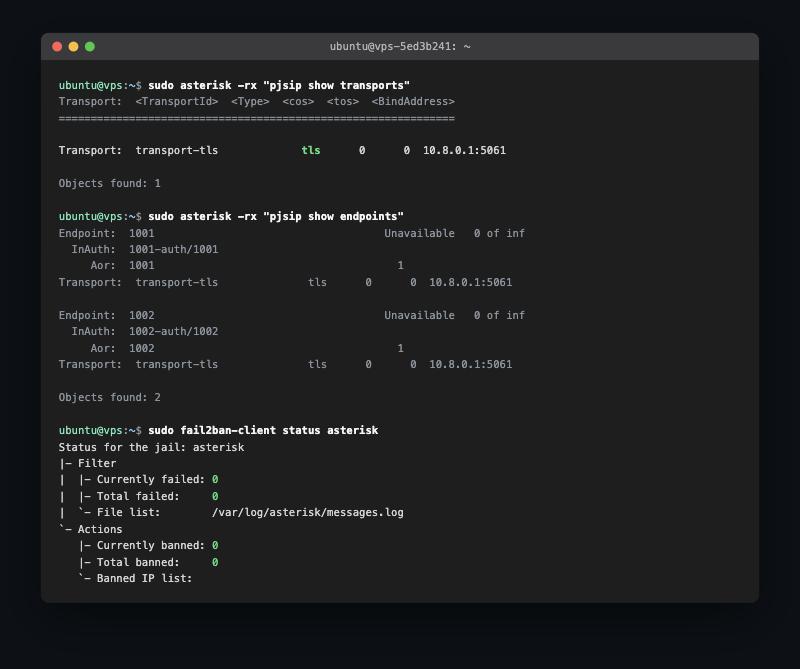
- TLS-only SIP transport. I didn’t configure a plaintext UDP transport at all: only
transport-tlson port 5061, backed by a self-signed cert (fine for a private lab; a public-facing deployment would use a proper CA like Let’s Encrypt instead). - Mandatory SRTP. Every extension has
media_encryption=sdeswith no unencrypted fallback, so call audio is encrypted with AES_CM_128_HMAC_SHA1_80 for every single call, not just the ones a client happens to request.
But the bigger decision was where this is reachable from at all.
The real lesson: bind address isn’t the same as firewall rule
Following the same pattern I used for my monitoring stack, I bound the TLS transport specifically to my WireGuard VPN interface (10.8.0.1:5061) instead of 0.0.0.0. SIP scanning for weak extensions (a real, constant background threat: attackers hunting for toll fraud) simply can’t reach a port that was never listening on the public interface in the first place. That part worked immediately.
Then I tried to actually register a test client over the VPN, and it timed out completely: not an auth failure, not a TLS error, just silence. I checked the bind address again (correct), checked the TLS cert (fine), and eventually just tried a raw openssl s_client connection to the port, which also hung. That ruled out Asterisk and pointed straight at the network path.
The actual bug: binding a service to an interface only controls where it listens; it says nothing about whether the firewall lets traffic reach it. UFW’s default-deny policy was silently dropping the connection because I’d never added an explicit allow rule for port 5061 at all. Binding to the VPN interface stops public exposure, but the firewall still has to be told the VPN traffic itself is allowed:
1
2
sudo ufw allow from 10.8.0.0/24 to any port 5061 proto tcp
sudo ufw allow from 10.8.0.0/24 to any port 10000:10050 proto udp
Scoped to the VPN subnet specifically, not “anywhere,” so the rule adds defense-in-depth on top of the interface binding rather than replacing it. The moment that rule existed, the TLS handshake and registration both went through instantly.
Defense in depth, even behind a VPN
The VPN already eliminates most of the public attack surface, but I added fail2ban watching Asterisk’s auth log anyway: 5 failed authentications in 10 minutes bans the source for an hour. It’s not strictly necessary against the public internet anymore, but it protects against a compromised or careless VPN peer trying to brute-force other extensions, and it’s the kind of layered thinking that matters once you’re responsible for infrastructure other people depend on.
Verifying it actually works
Config that “looks right” isn’t the same as config that works, so I registered a real SIP client (baresip, over TLS) as an extension and dialed a test extension wired to Asterisk’s Echo() application. The SIP trace confirmed the whole path:
REGISTER→401 Unauthorizedwith a digest challenge → re-REGISTERwith credentials →200 OKINVITE→ same digest challenge/response pattern →200 OK, call answeredsrtp: audio: SRTP is Enabled (cryptosuite=AES_CM_128_HMAC_SHA1_80): encrypted media confirmed, not just negotiated- Clean
BYE→200 OKon hangup
A real encrypted call, registered, authenticated, and torn down correctly: not just a config file that parses without errors.
What’s next
Two extensions and an Echo() test isn’t a PBX yet: inter-extension dialing, voicemail, and eventually a proper CA-signed cert if this ever needs to serve calls beyond my own VPN are the obvious next steps. But the security posture (TLS signaling, mandatory SRTP, VPN-only reachability, firewall scoped to that VPN subnet, and fail2ban watching the rest) is the part I actually wanted to get right first.
Happy dialing!